

Track AI referral traffic in GA4 by creating a dedicated AI Referrals channel, then use Search Console to measure the Google Search side that GA4 cannot see clearly. GA4 is best for visits, engagement, conversions, and revenue after someone clicks from ChatGPT, Perplexity, Claude, Copilot, or Gemini. Search Console is better for Google Search visibility, including clicks and impressions tied to pages and queries. GA4 traffic source dimensions such as session source and session medium are the practical starting point for this work [source: Google Analytics Help].
TLDR: Use GA4 to track AI referral sessions and conversions, and use Search Console to track Google Search exposure that may include AI-driven search experiences. For example, a B2B SaaS site might find 420 monthly sessions from chatgpt.com and perplexity.ai in GA4, with a 6.4% demo conversion rate, while Search Console shows 18,000 impressions for the same landing pages. The two tools will not match, and they are not supposed to. Treat GA4 as your behavior and conversion tool, and Search Console as your visibility and query tool.
Why AI traffic is hard to measure
AI traffic does not arrive in one clean bucket. Some visits show up as referrals from domains such as chatgpt.com, perplexity.ai, claude.ai, copilot.microsoft.com, or gemini.google.com. Others come through browsers, mobile apps, privacy tools, or copied links, which can strip referral data.
The most annoying part is simple: the user may have discovered you through AI, but GA4 may record the visit as direct traffic. That is not a strategy problem. It is a measurement gap. Expect some lost attribution.
Search Console has a different limitation. It can show Google Search clicks, impressions, queries, and pages. But it does not give one clean report called “AI Overview traffic.” Google has stated that Search Console reports include performance from AI features in Search, but the data is not split into a separate AI-only view [source: Google Search Central].

GA4 vs Search Console: what each tool can measure
GA4 measures what happens after the click. It answers questions such as:
- How many sessions came from AI referral domains?
- Which landing pages received those visits?
- Did users engage, sign up, purchase, or request a demo?
- Which AI platforms send the highest-value visitors?
Search Console measures Google Search exposure. It answers different questions:
- Which pages earned impressions in Google Search?
- Which queries drove clicks?
- Did clicks change after AI Overviews became more common?
- Which pages have high impressions but weak click-through rates?
This split matters. If Perplexity sends 900 visits and 30 leads, GA4 can show that clearly. If Google shows your page inside an AI-generated search result, Search Console may reflect the click and impression, but not as a separate AI report. That is why serious reporting needs both tools.
How to track AI referral traffic in GA4
Start with a clean list of known AI referrers. Keep it updated. New tools appear often, and existing tools change domains.
Common AI sources to check include:
- chatgpt.com
- chat.openai.com
- perplexity.ai
- claude.ai
- copilot.microsoft.com
- gemini.google.com
- you.com
- phind.com
In GA4, go to Reports, then Acquisition, then Traffic acquisition. Change the main dimension to Session source / medium. Search for known AI domains. You can also use an exploration report for more control.
A useful regular expression might look like this:
chatgpt|openai|perplexity|claude|copilot|gemini|you\.com|phind
Save this as a comparison or use it in an exploration. For long-term reporting, create a custom channel group called AI Referrals. Set rules based on session source matching your AI domain list. This makes reporting cleaner for leadership, clients, or monthly SEO reviews.
It drives me crazy that GA4 can make this feel like a small detective job when all you want is one clean line item. Still, once the channel group is built, the reporting becomes much easier.

What to report in GA4
Do not stop at sessions. Sessions alone can make AI traffic look either better or worse than it is. Report quality.
Use these GA4 metrics:
- Sessions: total visits from AI referrers.
- Engaged sessions: visits with meaningful interaction.
- Engagement rate: stronger than basic bounce-style thinking.
- Key events: form submits, purchases, trials, calls, or downloads.
- Revenue: critical for ecommerce and paid products.
- Landing page: shows which content AI tools are citing or sending users to.
A good monthly report might say: AI referrals produced 1,240 sessions, 804 engaged sessions, 52 lead form submissions, and $9,600 in attributed pipeline. Perplexity had the highest engagement rate at 71%, while ChatGPT drove the most total conversions.
How to use Search Console for AI-related search analysis
Search Console will not label every AI-influenced click. So use it for trend analysis instead. Compare pages that are likely to appear in AI answers, such as guides, comparisons, definitions, pricing explainers, and problem-solving articles.
Check these areas:
- Performance by page: find pages with rising impressions but falling clicks.
- Performance by query: look for informational queries where AI answers may reduce clicks.
- Click-through rate: monitor pages that lose clicks despite stable rankings.
- Date comparisons: compare the last 28 days with the previous 28 days.
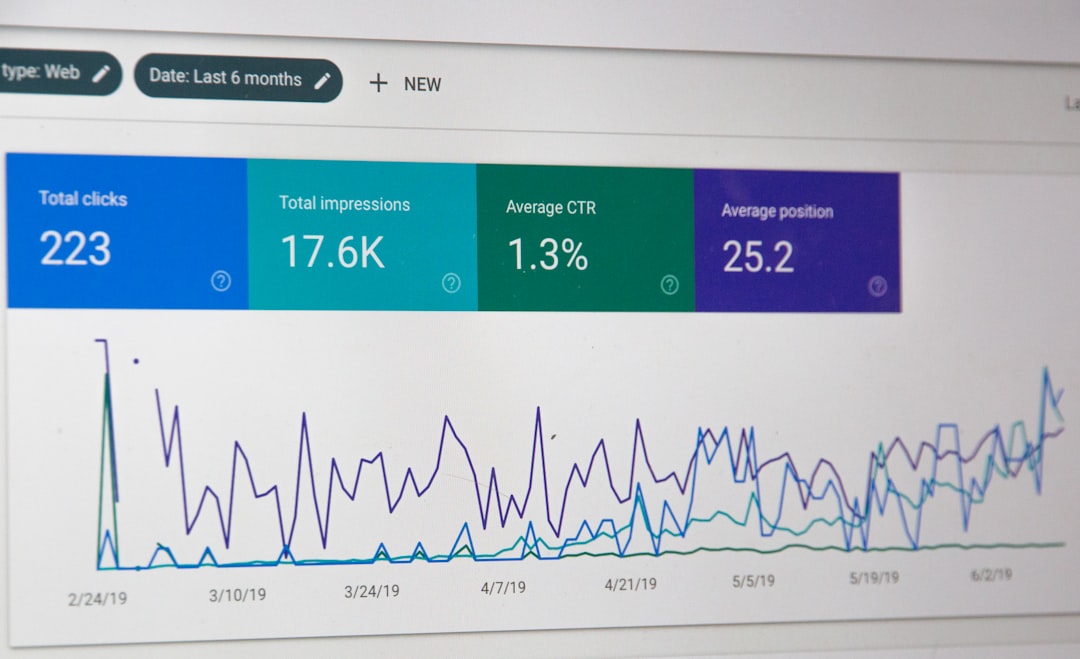
If a page has 40,000 impressions, a 2.8% CTR, and then drops to 1.6% CTR while average position stays similar, AI search features may be part of the story. Do not claim certainty from that alone. Treat it as a signal, then review the live search results.
Use UTMs when you control the link
For links you place inside your own AI tools, custom GPTs, support bots, chat widgets, or prompt libraries, use UTMs. This removes guesswork.
Example:
?utm_source=chatgpt&utm_medium=ai_assistant&utm_campaign=product_recommendation
This is especially useful for companies building AI assistants that recommend help docs, product pages, booking forms, or ecommerce categories. Without UTMs, that traffic may appear as referral, direct, or something less useful.
Common mistakes to avoid
- Do not treat direct traffic as proof of AI traffic. Some AI-driven visits may hide there, but direct is too broad.
- Do not compare GA4 clicks to Search Console clicks one-to-one. They use different methods and scopes.
- Do not exclude AI domains as unwanted referrals. That can erase useful attribution.
- Do not report only volume. AI traffic with poor conversion value may not deserve much attention.
- Do not expect perfect tracking. Privacy rules, apps, and browsers will block some referral data.
The best practical setup
The strongest setup is simple. Use GA4 custom channel groups for AI referral traffic. Use Search Console for page and query visibility. Use UTM tags anywhere you control the AI-generated link. Then report the overlap with care.
A serious AI traffic report should separate three buckets: confirmed AI referrals in GA4, possible AI search impact in Search Console, and unknown or direct traffic that cannot be proven. That wording protects trust. It also keeps the data useful.
GA4 and Search Console are not rivals here. They answer different questions. GA4 tells you who arrived and what they did. Search Console tells you how Google Search visibility is changing. Use both, and you will get a much clearer picture of AI traffic without pretending the data is cleaner than it is.